This website uses Cookies. Click Accept to agree to our website's cookie use as described in our Privacy Policy. Click Preferences to customize your cookie settings.
Extensions
Turn on suggestions
Auto-suggest helps you quickly narrow down your search results by suggesting possible matches as you type.
- Community Home
- Platform
- Extensions
- Re: Extension V2 Python dependencies ModuleNotFoundError: No module named
Options
- Subscribe to RSS Feed
- Mark Topic as New
- Mark Topic as Read
- Pin this Topic for Current User
- Printer Friendly Page


Options
- Mark as New
- Subscribe to RSS Feed
- Permalink
28 Mar 2024
10:25 AM
- last edited on
10 May 2024
03:22 PM
by
 Michal_Gebacki
Hello,
I'm developing an V2 python extension which works like a charm locally.
But when I build and upload it the
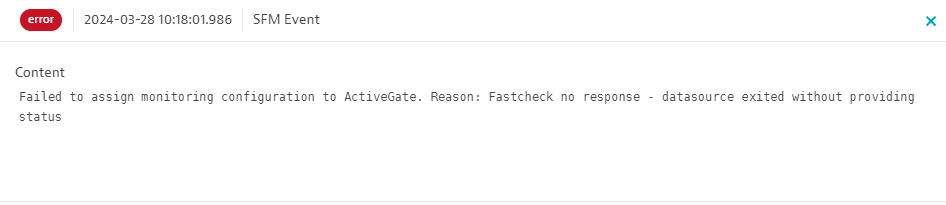
And I can found the following exception on python.exe_fastcheck/log :
[err] File "C:\ProgramData\dynatrace\remotepluginmodule\agent\runtime\extensions\python_venvs\custom_reviews_0.0.9\lib\site-packages\reviews\__main__.py", line 1, in <module>
[err] from google_play_scraper import app, Sort, reviews_all
[err]ModuleNotFoundError: No module named 'google_play_scraper'
On vscode how to add the dependency to take it in charge during the building of the extension ?
Thank you, regards.
Observability consultant - Dynatrace Associate/Pro/Services certified
Solved! Go to Solution.
Labels:
- Labels:
-
extensions
-
python
Reply
2 REPLIES 2

Options
- Mark as New
- Subscribe to RSS Feed
- Permalink
28 Mar 2024 12:44 PM
Inside the setup.py file in the folder of the extension, add the dependencies to the install_requires line, such as this:
install_requires=["dynatrace_extension", "requests"],
Mike
Reply
Options
- Mark as New
- Subscribe to RSS Feed
- Permalink
28 Mar 2024 08:29 PM
Thank you @Mike_L ,
You help me to solve my issue !
First of all, as you mentioned, I have edited the "setup.py" file to add my dependency as a new "install_requires".
But it was also mandatory in my case to update the version number :
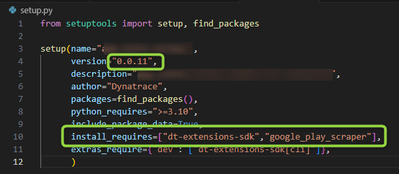
git hub link :
Bumping version :
When bumping the version of the extension in the extension.yaml, the setup.py file must be updated as well. The two versions must match.
Thank you so much.
Best regards, Aurélien.
Observability consultant - Dynatrace Associate/Pro/Services certified

Featured Posts
