This website uses Cookies. Click Accept to agree to our website's cookie use as described in our Privacy Policy. Click Preferences to customize your cookie settings.
Troubleshooting
Articles about how to solve the most common problems
Turn on suggestions
Auto-suggest helps you quickly narrow down your search results by suggesting possible matches as you type.
- Community Home
- Platform
- Troubleshooting
- How to perform mouseover event on browser clickpath synthetic monitor
Options
- Subscribe to RSS Feed
- Mark as New
- Mark as Read
- Printer Friendly Page

 Mareeswaran
Dynatrace Advisor
Options
- Mark as New
- Subscribe to RSS Feed
- Permalink
on
12 Apr 2023
10:20 AM
- edited on
09 Dec 2025
12:48 PM
by
HannahM
Summary: Sometimes, a page requires you to hover over or mouse over an element rather than clicking on it. This can be done in Dynatrace Synthetic using a JavaScript event.
Steps to perform a mouseover event in a Browser clickpath
-
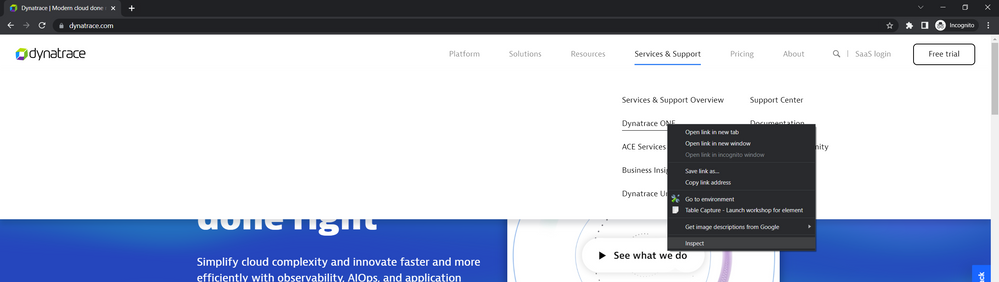
Go to the relevant page in a Chrome browser.
-
Right-click on the element that you want to interact with on the page-> Inspect the element, which will open the developer tools
-
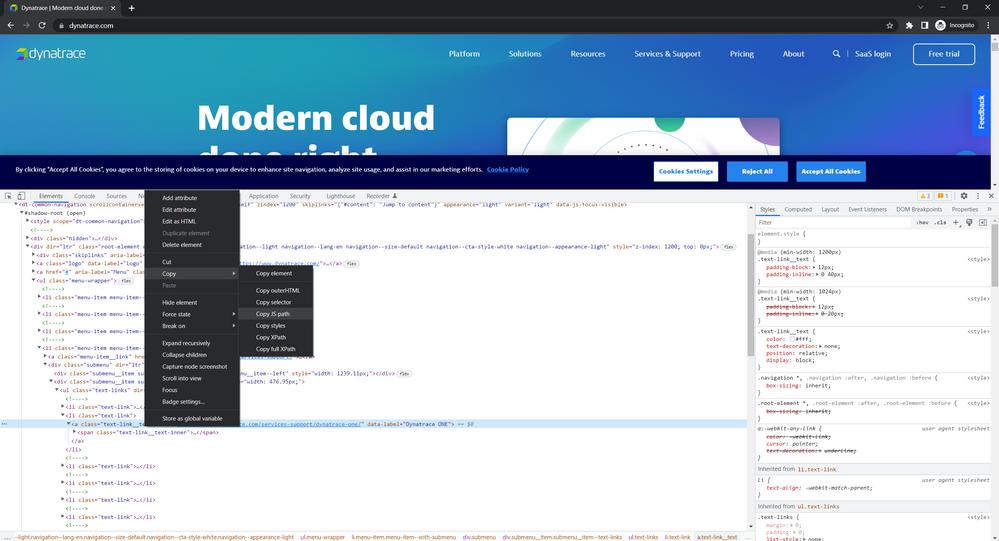
Right-click on the element in the Web Developer Tools -> Copy -> Copy JS path
-
Paste the JS path in the below element value, and add this JavaScript code into the JavaScript Event of your Browser clickpath monitor.
function triggerevent(element)
{
var evt = document.createEvent("MouseEvent");
evt.initMouseEvent("mouseover",true, true);
element.dispatchEvent(evt);
}

var element = document.querySelector('button[id="testid"]'); //Replace with the element which you want to perform the mouseover action.
triggerevent(element);

What's next
Open a chat or contact support if
- you need to check the logs for an HTTP Monitor running on a public location, or
- The issue is still not resolved after taking the above actions
What to read next:


Labels:



Community freeze: read-only from October 22, 6:00 AM UTC, while we move to Discourse. Outage (~1h) on October 26 at 9:00 AM UTC. Learn more.