Self Service Summary
This article of type Full-Self-Service gives an overview about Kubernetes monitoring modes and helps with known false positive scan results for Dynatrace on Kubernetes.
| Issues | Solution | Alternatives |
| You'd like to understand the architecture of supported Kubernetes monitoring options.Your security team or scanner is reporting Kubernetes security control violations. | Check below [1] deployment methods including architecture diagrams and [2] security requirements. | Report a security vulnerabilityStart a chat with Dynatrace Customer Success for installation questions |
[1] Monitoring modes
Full Kubernetes Observability (recommended)
Features: Immediate insights into Kubernetes health (see Kubernetes Observability below) and out-of-the-box distributed tracing and analytics for workloads (see Application Observability below).
Deployment options
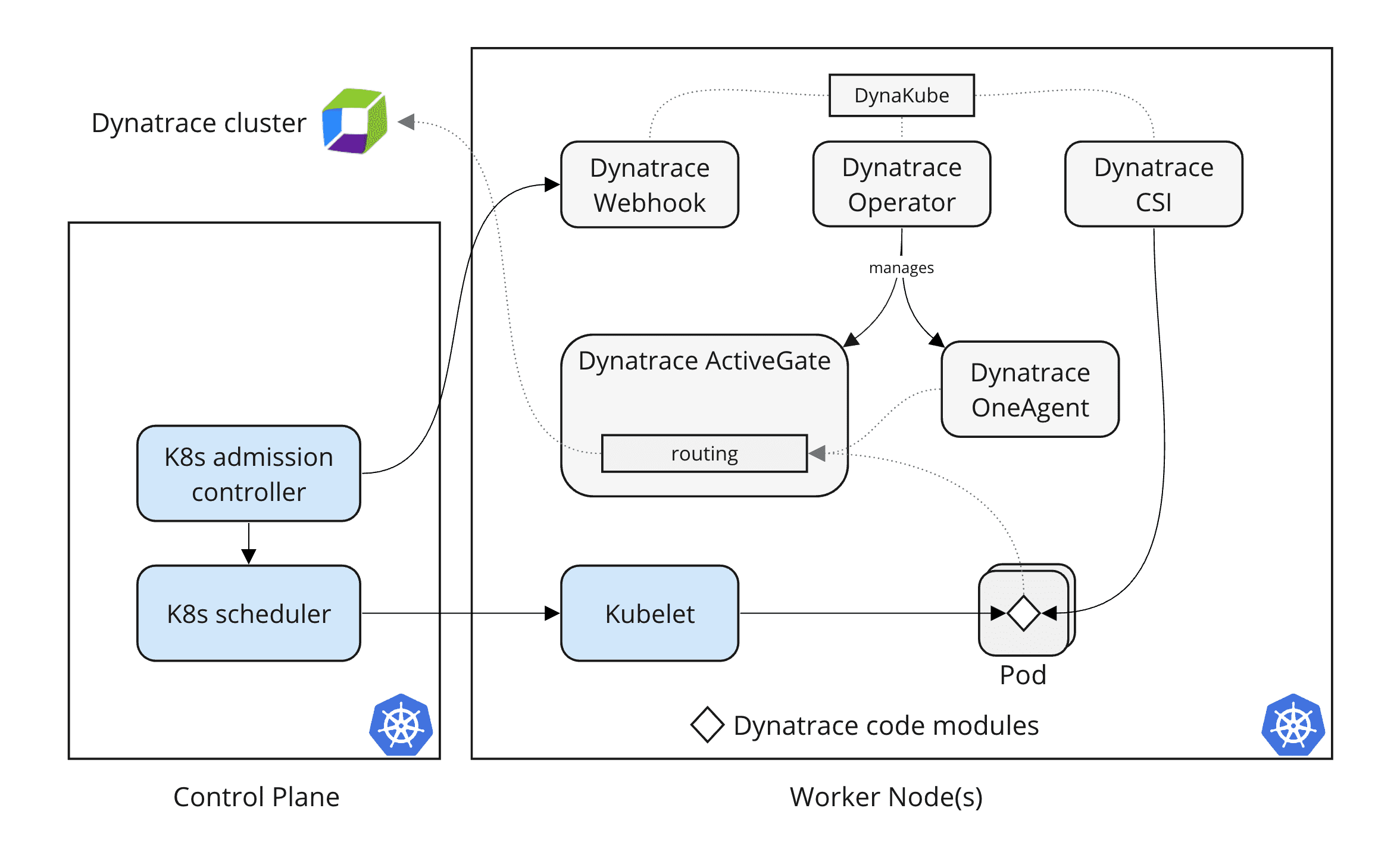
- Recommended: Deploy Dynatrace Operator in cloud native full stack mode
Architecture: Cloud native full-stack injection - Other: Deploy Dynatrace Operator in classic full stack mode
Limitation: There’s a startup dependency between the container in which OneAgent is deployed and application containers to be instrumented (for example, containers that have deep process monitoring enabled). The OneAgent container must be started and the oneagenthelper process must be running before the application container is launched so that the application can be properly instrumented. - Deprecated: Manual OneAgent rollout via Daemonset (not based on Dynatrace Operator)
Kubernetes Observability
Features: Understand and troubleshoot the health of your cluster including dashboards, root-causes analysis with DAVIS Causal AI, alerting, resource optimization, and log analytics.
Deployment
Deploy Dynatrace Operator for Kubernetes observability
Architecture: Kubernetes Platform Monitoring

Application Observability
Features: Automated distributed tracing and code-level visibility including memory, thread and process metrics, application logs, user sessions for web and mobile, vulnerability detection.
Deployment options
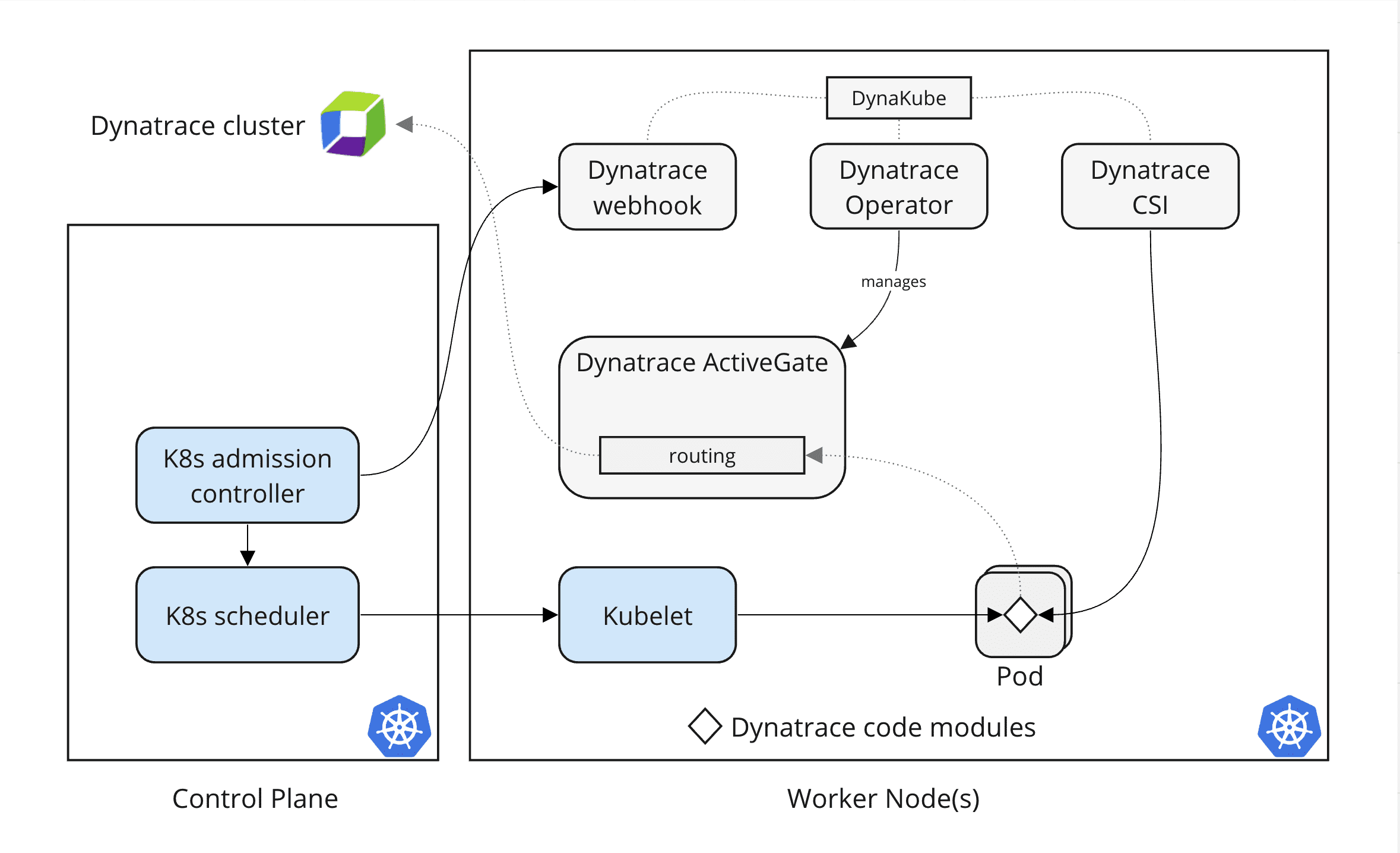
- Recommended: Deploy Dynatrace Operator in application monitoring mode
Architecture: Automatic injection - Other
- Deployment: Pod-runtime injection
Architecture: Pod-runtime injection - Deployment: Build-time injection
Architecture: Container build-time injection
- Deployment: Pod-runtime injection


Alternative
Deploy OneAgent on Docker host
Alternatively, you can also deploy OneAgent on the Docker host on Linux. In this scenario, OneAgent does not run in a container but directly on the host, so there is no Linux namespace isolation. For more information, see OneAgent on Linux.
Architecture: Host monitoring

[2] Security controls
Issue
Customer reported Kubernetes security control violations and vulnerabilities include:
- Running containers as root user should be avoided
- Least privileged Linux capabilities should be enforced for containers
- Immutable (read-only) root filesystem should be enforced for containers
- Kubernetes clusters should not grant CAPSYSADMIN security capabilities
- Containers should only use allowed AppArmor profiles
- Kubernetes clusters should disable automounting API credentials
Solution
Dynatrace Full-Stack Monitoring for container platforms from the application down to the infrastructure layer requires elevated privileges to get container-level metrics and perform deep-code host monitoring, including OneAgent injection into processes. The above scan results can be considered as false positives.
Security requirements:
- Security controls implications to understand false positives: Dynatrace Operator security — Dynatrace Docs
- Required permissions: Dynatrace Operator security — Dynatrace Docs
However, if you don’t want to grant elevated privileges to OneAgent, or you don’t have access to the infrastructure layer, you can go with application-only monitoring.