This website uses Cookies. Click Accept to agree to our website's cookie use as described in our Privacy Policy. Click Preferences to customize your cookie settings.
Container platforms
Questions about Kubernetes, OpenShift, Docker, and more.
Turn on suggestions
Auto-suggest helps you quickly narrow down your search results by suggesting possible matches as you type.
- Community Home
- Platform
- Container platforms
- Re: Activation of deep monitoring is unsuccessful with permission mission error for process
Options
- Subscribe to RSS Feed
- Mark Topic as New
- Mark Topic as Read
- Pin this Topic for Current User
- Printer Friendly Page

Options
- Mark as New
- Subscribe to RSS Feed
- Permalink
23 Mar 2020
11:23 AM
- last edited on
16 Dec 2021
11:32 AM
by
 MaciejNeumann
Hi Team,
The apache process is activation for deep monitoring is unsuccessful with error permission issue for the process. the process is running as a container on kubernetes cluster node, Other process running on the same vm are monitoring without any issues.
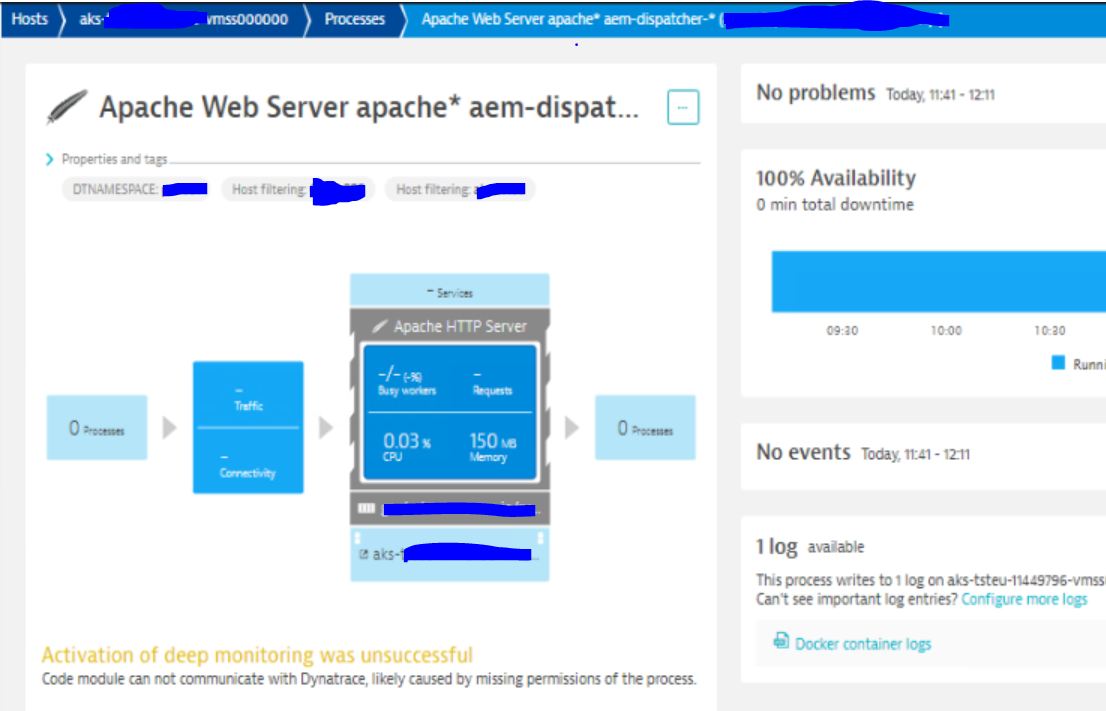
does anyone face the similar issue? can anyone confirm what permissions it required.
Solved! Go to Solution.
Labels:
- Labels:
-
docker
-
kubernetes
-
oneagent
7 REPLIES 7

Options
- Mark as New
- Subscribe to RSS Feed
- Permalink
23 Mar 2020 12:54 PM
Hi Mayana,
There may be an issue with the startup times for the containers depending on deployment strategy?
There is a startup dependency between the container in which OneAgent is deployed and application containers to be instrumented (i.e., which have deep process monitoring enabled). The OneAgent container must be started and the oneagenthelper process must be running prior to the application container being launched so that the application can be properly instrumented.
How are you deploying the OneAgent?
Best regards,
Radu
Options
- Mark as New
- Subscribe to RSS Feed
- Permalink
23 Mar 2020 02:27 PM
Hi @Radu S.,
The process has been started after the dynatrace one-agnet process is started. Its showing some permission issues.
We have deployed dynatrace one-agent process as docker deamon.
Options
- Mark as New
- Subscribe to RSS Feed
- Permalink
24 Mar 2020 08:47 AM
Hi @Mayana K.
Try browsing through the OneAgent logs, especially the ones created for Apache where you should look for indication of errors.
Commonly this may also be a networking issue, if so, the log should have messages similar to "URL https://xxxxxxx:9999/communication not working".
As well, have you already tried restarting the apache process?

Options
- Mark as New
- Subscribe to RSS Feed
- Permalink
28 Apr 2026 11:45 AM
Hello Radu,
I have the same problem. Processes were restarted however the oneagent communicates with AG via port 443. COuld this be the problem? Becuase I have found lots of errors You mentioned but also found messages saying the communication works via 443.
Thanks
Kind regards
Peter


Options
- Mark as New
- Subscribe to RSS Feed
- Permalink
30 Apr 2026 07:37 AM
@Peter_Lepsis Can you describe your situation more?
OneAgents have a list of communication endpoints (configuration file - from installation / k8s deployment, get that from the Operator). It will be updated as soon as the OA connects.
Network zones may have a role here if you use them, and it depends on how zones are configured (fallback zones).
Dynatrace Ambassador | Alanata a.s., Slovakia, Dynatrace Master Partner
Reply
Options
- Mark as New
- Subscribe to RSS Feed
- Permalink
06 May 2026 08:37 PM
Yes, I know that. As I mentioned in the Oneagent pod's ruxitagent log file I found these entrie:
2026-03-29 00:26:57.632 UTC [0038a353] info    [comm  ] URL https://*********************:9999/communication not working (Connection timed out after 2000 milliseconds) (occurred 3 times in the last 1h 0m 0s)
2026-03-29 00:26:59.633 UTC [0038a353] info    [comm  ] URL https://10.178.109.7:9999/communication not working (Connection timed out after 2000 milliseconds) (occurred 3 times in the last 1h 0m 0s)
2026-03-29 00:27:01.634 UTC [0038a353] info    [comm  ] URL https://10.43.247.61:443/communication not working (Connection timed out after 2000 milliseconds) (occurred 3 times in the last 1h 0m 0s)
2026-03-29 00:27:01.669 UTC [0038a353] info    [comm  ] URL https://uniqak8sdt-activegate.dynatrace-operator:443/communication not working (Could not resolve host: uniqak8sdt-activegate.dynatrace-operator) (occurred 3 times in the last 1h 0m 0s)
2026-03-29 00:27:03.670 UTC [0038a353] info    [comm  ] URL https://*********************:9999/communication not working (Connection timed out after 2000 milliseconds) (occurred 3 times in the last 1h 0m 0s)
2026-03-29 00:27:03.886 UTC [0038a572] warning [native]  updateMetrics took longer than expected: 3715 ms. Check the profiler output.
2026-03-29 00:27:05.671 UTC [0038a353] info    [comm  ] URL https://10.178.109.5:9999/communication not working (Connection timed out after 2000 milliseconds) (occurred 3 times in the last 1h 0m 0s)
2026-03-29 00:27:06.616 UTC [0038a353] info    [comm  ] Connected to https://*********************:443/communication
from this entry can be seen that the pod can communicate only on the 443 port.
Thansk
Kind regards
Peter
Options
- Mark as New
- Subscribe to RSS Feed
- Permalink
06 May 2026 08:55 PM
@Peter_Lepsis, without knowing your environment, it's hard to give any suggestions. From the pod (assuming it's from K8s), it's not possible to connect to these endpoints. There can be multiple reasons, such as firewalls, Kubernetes network policies .... You must check the connectivity from the pod to your desired ActiveGate.
Dynatrace Ambassador | Alanata a.s., Slovakia, Dynatrace Master Partner

Featured Posts
