This website uses Cookies. Click Accept to agree to our website's cookie use as described in our Privacy Policy. Click Preferences to customize your cookie settings.
Dashboarding
Dynatrace dashboards, notebooks, and data explorer explained.
Turn on suggestions
Auto-suggest helps you quickly narrow down your search results by suggesting possible matches as you type.
- Community Home
- Platform
- Dashboarding
- Issue with missing metric data in DataExplorer - "Metric data is missing from the result!"
Options
- Subscribe to RSS Feed
- Mark Topic as New
- Mark Topic as Read
- Pin this Topic for Current User
- Printer Friendly Page

Options
- Mark as New
- Subscribe to RSS Feed
- Permalink
10 Mar 2025
03:37 PM
- last edited on
11 Mar 2025
07:38 AM
by
 MaciejNeumann
Hello Dynatrace Community,
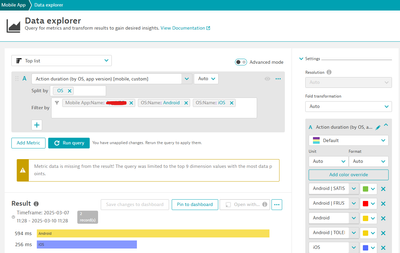
I am encountering an issue when querying metrics in DataExplorer. When attempting to retrieve data for a specific metric, I receive the following error message:
"Metric data is missing from the result! The query was limited to the top 9 dimension values with the most data points."
Could you assist me in resolving this issue or provide more details on how to optimize this query?
Thank you in advance for your help.
Best regards,
Solved! Go to Solution.
Labels:
- Labels:
-
dashboards
-
data explorer
-
metrics
3 REPLIES 3

Options
- Mark as New
- Subscribe to RSS Feed
- Permalink
24 Nov 2025 02:27 PM
Hello, Community!
Has anyone faced issue similar to that described in the post above? Do you know what might be the reason and how to overcome that?
Any help is highly appreciated, thank you!


Options
- Mark as New
- Subscribe to RSS Feed
- Permalink
24 Nov 2025 09:25 PM
Hi,
i think this metric not exist anymore.

The “Action duration (by key user action, OS)” metric is part of the deprecated Mobile RUM metric set, which was replaced when Dynatrace moved mobile data to Grail.
Action duration is no longer provided as a metric — it is now a field in the dt.useraction event or something like that

Options
- Mark as New
- Subscribe to RSS Feed
- Permalink
16 Feb 2026 08:01 AM
Hi,
The fact that data for this metric is still displayed means that it still carries chartable data. "Classic" metrics are still active in Dynatrace (for the moment) so should still be usable.
I have a Calculated Service Metric (CSM) which reports on response time for traces processed, split by a request attribute-based dimension. The CSM is set to limit its resultset to the top 10 dimensional values. When charting this CSM using the Data Explorer, I also get the warning that you get.
Seems like the warning tells you that the metric carries more data than what its set to keep (I.e. the dimension). It only displays the top 10 records but there are more than 10 in existance in my case - I see your chart is set to only display 9 values. Do you limit the resultset somehow?
Regards
Francois
Do you have a

Featured Posts
