This website uses Cookies. Click Accept to agree to our website's cookie use as described in our Privacy Policy. Click Preferences to customize your cookie settings.
Open Q&A
If there's no good subforum for your question - ask it here!
Turn on suggestions
Auto-suggest helps you quickly narrow down your search results by suggesting possible matches as you type.
- Community Home
- Platform
- Open Q&A
- Check Network Latency When Investigating Dynatrace Response Time Degradation
Options
- Subscribe to RSS Feed
- Mark Topic as New
- Mark Topic as Read
- Pin this Topic for Current User
- Printer Friendly Page

Options
- Mark as New
- Subscribe to RSS Feed
- Permalink
27 Jul 2023
01:10 PM
- last edited on
23 Jan 2026
08:25 AM
by
 IzabelaRokita
Hi DT community, pls guide me on where we can see the latency in the response time degradation.
In the screenshot, the response time is 19.75s, and the baseline is 32.87ms. How can I see where the response time is taking longer, and how can I check the latency?
Solved! Go to Solution.
Labels:
- Labels:
-
network monitoring
Reply
1 REPLY 1

Options
- Mark as New
- Subscribe to RSS Feed
- Permalink
28 Jul 2023 03:54 AM
Hey Asha,
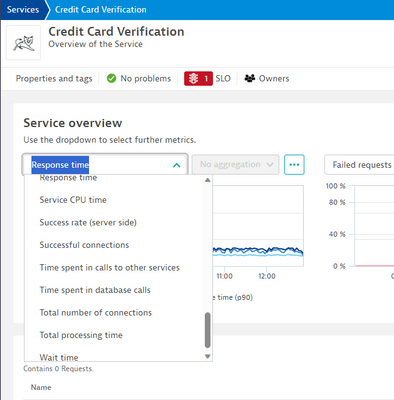
Your post here doesn't seem to have a picture attached so it will be a little difficult to assist. However, if this is in reference to a services response time, you can head over to the service page and graph different contributers to the service as shown in the following screenshot. You can also then open them in the data explorer to get a larger view of them. This should give you an idea of what has increased. You can also, from the service page, click on response time hotspots which should give you an idea of what's contributing the most.
Reply

Featured Posts
