This website uses Cookies. Click Accept to agree to our website's cookie use as described in our Privacy Policy. Click Preferences to customize your cookie settings.
Open Q&A
If there's no good subforum for your question - ask it here!
Turn on suggestions
Auto-suggest helps you quickly narrow down your search results by suggesting possible matches as you type.
- Community Home
- Platform
- Open Q&A
- Re: Shine some light on the new "Generic Topology Model"
Options
- Subscribe to RSS Feed
- Mark Topic as New
- Mark Topic as Read
- Pin this Topic for Current User
- Printer Friendly Page


Options
- Mark as New
- Subscribe to RSS Feed
- Permalink
23 Apr 2021
08:11 PM
- last edited on
01 Jul 2021
01:29 PM
by
 MaciejNeumann
Has anyone from the Dynatrace Team some more info on the new feature "Topology Model"?
Since it's already there I wanted to tap into it to e.g. map out some kind of network routing topology maybe?
Nothing in the docs or in any blogpost, seems like a featureflag that was turned on without any purpose 🙂
Certified Dynatrace Master, Dynatrace Partner - 360Performance.net
Solved! Go to Solution.
Labels:
- Labels:
-
metrics
Reply
19 REPLIES 19

Options
- Mark as New
- Subscribe to RSS Feed
- Permalink
24 Apr 2021 02:30 PM - edited 24 Apr 2021 02:35 PM
It’s for defining a custom topology to deal with custom metrics. Here is some information from help on the subject: https://www.dynatrace.com/support/help/how-to-use-dynatrace/metrics/metric-ingestion/topology-model/...
Reply

Options
- Mark as New
- Subscribe to RSS Feed
- Permalink
26 Apr 2021 04:53 AM
That looks crazy powerful.... Awesome.
Options
- Mark as New
- Subscribe to RSS Feed
- Permalink
26 Apr 2021 08:24 AM
Thanks! Last time I checked the Documentation wasn't there yet.
It also seems a bit 'outdated' some of the UI sections are not well described.
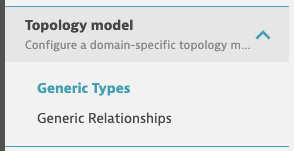
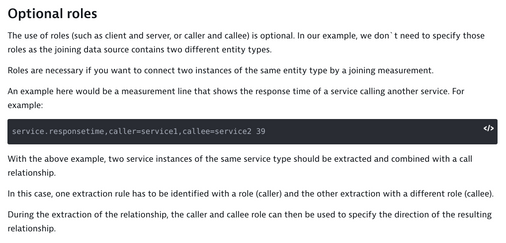
I tried to set up some relationships as described here:
I'm testing with data ingests like this:
threesixtyperf.network.tracert,src=<ip>,dst=<ip> 200Basically measuring the latency for route hops. To do that I thought of defining entities with relationships between eachother (mapping the route): src calls dst - which would map the routing path/dependency.
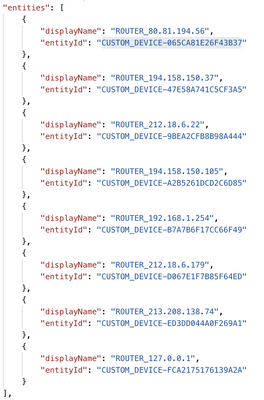
I'm able to get the custom entities, as confirmed by the entity API:
And entities like this:
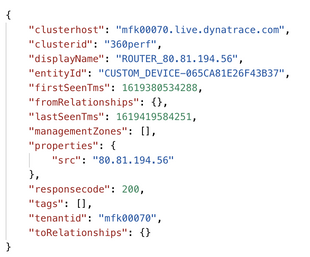
But I'm struggling with getting the relationship "calls" working. As per above description you need to define two extraction rules with different roles but the same entity type:
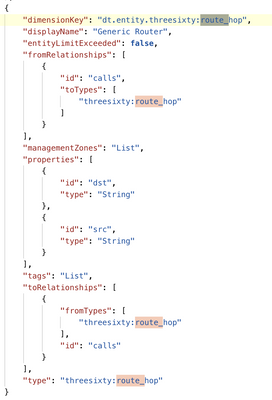
As per the documentation:
With the above example, two service instances of the same service type should be extracted and combined with a call relationship.
In this case, one extraction rule has to be identified with a role (caller) and the other extraction with a different role (callee).
During the extraction of the relationship, the caller and callee role can then be used to specify the direction of the resulting relationship.
I understand this as I need to define two extraction rules for the Generic Entity Type like this to define a role for "src" and one for "dst", so I can link the two with a call relationship.
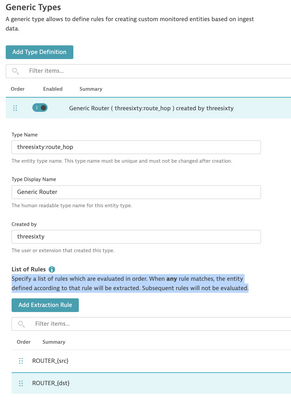
However in such a case the first rule will always match and thus the second will not be evaluated (note the remark in the screenshot that only one rule will be evaluated. So one entity cannot be "src" and "dst" at the same time. Also the example from the documentation (caller and callee) would not work if you want to model call dependencies like service1 -> service2 -> service3.
Maybe I'm missing something, but how would this work?
Thanks,
Reinhard
Certified Dynatrace Master, Dynatrace Partner - 360Performance.net
Reply
Options
- Mark as New
- Subscribe to RSS Feed
- Permalink
24 Apr 2021 02:37 PM
Here is another reference in help: https://www.dynatrace.com/support/help/shortlink/topology-model#custom-topology-model

Options
- Mark as New
- Subscribe to RSS Feed
- Permalink
26 Apr 2021 09:10 AM
Help documentation is here:
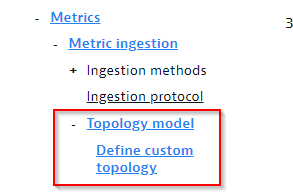
So far it's an API first feature, as the Dynatrace UIs for showing those custom entity types will come in one of the next releases.
As our newly introduced Extensions framework uses this possibility to define custom topology types and relationships, we decided to also show the new feature transparently in the settings, even if the UI is coming later.
I agree that my help on 'roles' is a bit thin, I will see to extend it to show the full configured screen and for what it is used.
In short, the roles are used to distinguish two instances of the same type, in case they appear in the same metric lines, as in your example with the three performance.
Best regards,
Wolfgang
Reply
Options
- Mark as New
- Subscribe to RSS Feed
- Permalink
06 May 2021 07:41 AM
HI @wolfgang_beer ,
I'm diving a bit deeper into this but I still haven't managed to get the roles (dependency between two entities of the same type) to work. It would be great to get a working example for this!
Thanks,
Reinhard
Certified Dynatrace Master, Dynatrace Partner - 360Performance.net
Reply

Options
- Mark as New
- Subscribe to RSS Feed
- Permalink
06 May 2021 10:31 AM
Hi Reinhard,
I will briefly talk about this in tomorrow's Partner Tech Update: https://info.dynatrace.com/global_all_wc_tech_update_series_15977_registration.html
Thomas
Reply
Options
- Mark as New
- Subscribe to RSS Feed
- Permalink
07 May 2021 01:09 PM
Funny to see you're back at Dynatrace again! You might remember me under a different name though....was is 2012 when you left the lab? 🙂
Certified Dynatrace Master, Dynatrace Partner - 360Performance.net
Options
- Mark as New
- Subscribe to RSS Feed
- Permalink
11 May 2021 07:50 AM
Of course I remember 😁
Yep, left the lab in 2012, joined again in 2019 - you always get to meet each other twice!
Reply

Options
- Mark as New
- Subscribe to RSS Feed
- Permalink
21 May 2023 04:18 PM
Hi All!
I would like to follow up on this thread. I have also tried to implement a kind of IoT like monitoring with custom topology. Metrics are flowing in nicely and I can setup alerting on top of it. But it seems the entity relationship is not there. At least Davis did not correlate the related issues.
However, I am not sure what are the best practices and the best usage here:
- Is there any OOTB visualization of these custom relationships? Similar to the smartscape? Or any other way to visualize the custom relationship between the entities?
- Based on the documentation DavisAI correlates between the relationships. However, when I generates issues I don’t see any correlation.
- Can you explain to me what is the best usage of these capabilities? Based on the doc I can build nice IoT stuff on top of the custom topology. Is this something which is often used with Dynatrace? Do you have any example project which you can show so that I can understand the possibilities here?
Reply

Options
- Mark as New
- Subscribe to RSS Feed
- Permalink
22 May 2023 06:56 AM
Hi @sandorbihary ,
- Not at the moment, it's not visible in the SmartScape as you already know. Not sure if there a new "smartscape" app in the works for the Dynatrace platform.
- Based on my knowledge it does it only if there are certain relationship types between the entities - at least it works this way if you want to connect the custom topology with builtin entites. @wolfgang_beer is there any public documentation on how does the root cause analysis works in detail, which entity types will Davis pick up and what are the required relationships?
- The best usage is actually to extend the topolology and have your devices which don't fit into the builtin model monitored by Dynatrace.. You will probably create some Unified Analysis Screens which will show you data from your IoT devices also in relation. Then you can also use the Davis causal correlation analysis on them which I personally find super powerful and exciting during any problem investigation.
Dynatrace Ambassador | Alanata a.s., Slovakia, Dynatrace Master Partner
Options
- Mark as New
- Subscribe to RSS Feed
- Permalink
22 May 2023 07:41 AM
1.) Smartscape was never updated to also show the new topology types, mainly because smartscape view was restricted to a very static layer model that does not fit well with completely custom topology types. In Grail I would expect that we show all entity types in a new smartscape visu.
2.) Davis currently just follows the custom runs_on relationships. The others are ignored, except as you said if you trigger the causal correlation analysis, there we take all the relationships and entities that are used and defined on the same page. We will of course add all other relationships in the Grail Davis analyzer once we are ready.
Reply
Options
- Mark as New
- Subscribe to RSS Feed
- Permalink
22 May 2023 10:43 AM
It would really make sense for Davis to consider other relations if they are configured so (maybe a flag on the relationship definition?). This would improve coverage of root cause analysis on custom topologies which is currently limited.
Dynatrace Ambassador | Alanata a.s., Slovakia, Dynatrace Master Partner
Options
- Mark as New
- Subscribe to RSS Feed
- Permalink
22 May 2023 11:30 AM
Sure sure, there is no discussion about that. We plan to make it configurable with custom root-cause checks and traversal logic. Deployable through app definitions. At least thats the plan. Lets see how fast we can deliver that 🙂
Reply

Options
- Mark as New
- Subscribe to RSS Feed
- Permalink
21 Aug 2024 04:40 PM
Stumbled upon this conversation today as I was searching for info on custom topology and Davis. Curious if there have been any updates or enhancements to the topology model and relationships to support problem root cause analysis? With the continued expansion of the extension 2 framework we see several relationship types are being set by these extensions. Additionally we are creating our own types. I am looking for some guidance on what we can expect from problem event/metric correlation and problem root cause analysis for custom entity types based on the relationship types used. Will custom all custom entity types and all relationship types be traversed and analyzed?
Reply
Options
- Mark as New
- Subscribe to RSS Feed
- Permalink
22 Aug 2024 06:41 AM
Currently we are finishing the Davis Problems UI part with some significant enhancements. After this we will start to modify the Root-Cause engine to incorporate your additonal relationships and offer more configuration possibilities in terms of merge and split rules etc. We already started in that direction with a smaller feature which already considers network ALBs and to show root causes for those cloud load balancers.
Best greetings,
Wolfgang
Reply

Options
- Mark as New
- Subscribe to RSS Feed
- Permalink
16 Aug 2026 06:07 PM - edited 16 Aug 2026 06:29 PM
Hi @wolfgang_beer , any update on this? I'm currently trying to get some Problems from a custom alert to provide better Root Cause Analysis and Affected Entities lists for some custom storage extension entities that have relationships built to VMware entities (like Datastores, Disks, Hosts, etc..).
Now, at least according to this post, the Davis RCA only looks at runs_on relationship types? Is that true and is that documented anywhere because I don't remember seeing that mentioned. That also can't be correct because the Casual Analysis docs even specifically mention looking at calls relationship types (at least for services).
I've got my Problems producing an RCA for the storage disk space full alerts (I used RESOURCE_CONTENTION_EVENT since LOW_DISK_SPACE is only allowed on HOST type entities, which is a bummer... Not sure why that restriction exists...). But the affected entities only lists the storage volume itself. It doesn't list all of the downstream VMware datastores/disks/hosts/vm's that live on those storage volumes, even though I do have proper relationships mapped between them. However, I had different relationship types than runs_on setup.
I would very much like to know which relationship types Dynatrace Intelligence uses when it determines Root Cause, Related Entities, and Affected Entities. Are those each documented anywhere? If not, can we get that documented somewhere? That would be super helpful.
Reply
Options
- Mark as New
- Subscribe to RSS Feed
- Permalink
17 Aug 2026 06:59 AM
Dear @36Krazyfists ,
Dynatrace by default groups alerts that are active at the same time using a set of grouping correlation rules (which we will be transparently documenting in a couple of weeks from now, including to allow you to modify those rules).
Dynatrace also traditionally follows the PurePath ingested service to service calls relationships and the application to service calls relationships. For the underlying infrastructure we always followed the runs_on relationships.
Matter of fact is though, that while the grouping always is performed, the deeper RCA is only triggered when an event is either raised on a service entity and has a dt.query property attached for showing a DQL query that we can analyze.
At the moment I would not expect too much from custom device RCA, which will change gradually with the introduction of custom grouping rules in Sept.
Options
- Mark as New
- Subscribe to RSS Feed
- Permalink
19 Aug 2026 04:00 PM - edited 19 Aug 2026 09:35 PM
Hmm, can you tell me more about the dt.query dependency? I did suddenly start getting RCA results from my Problems alerts (although it just points to itself), but I didn't understand why it worked. Now because of your comment I realize it was because I added a dt.query property to my Event properties event template.
From the Davis AI Semantic Dictionary docs, it states that dt.query is used for showing a graph in the Problem card, so that was the reason I had added it. It doesn't mention anything about RCA being dependent on it.
What kind of query should we be putting there? Because my alert is a Records type analyzer, I tried building a query that would show me a graph of historical data in the Problem card, but I couldn't figure out how to get the graph filtered down to the entity/entities being alerted on. I tried a query like this:
timeseries {
     provisioned = max(purefa_volume_space_bytes, filter: {space == "total_provisioned"})
	 ,virtual = max(purefa_volume_space_bytes, filter: {space == "virtual"})
 }
	 ,by: `dt.entity.purestorage:fa-volume`
	 ,interval: 1m
	 ,filter: {
		`dt.entity.purestorage:fa-volume` == "{dt.entity.purestorage:fa-volume}"
	 }
 | fieldsAdd host_used_pct = 100 * virtual[] / provisioned[]
My hope there was that the event property engine would replace the {dt.entity.purestorage:fa-volume} in the filter, but it doesn't. I even tried replacing the dt.entity stuff with dt.smartscape to see if the graph would display properly in the new Problems app, but no, it doesn't work. For some reason, it doesn't resolve the {dt.entity.purestorage:fa-volume} (or the dt.smartscape version if I use that) to an actual ID.
What's really weird is that if I have my by:{} clause setup like this:
,by:{dt.entity.purefa:volume}
It will resolve that to the volume entity ID unless I put ticks around it. But even without ticks, it doesn't resolve it in the filter clause. It makes no sense...
But anyways, if I have the dt.entity/dt.smartscape filter in the dt.query, the query doesn't work and I don't get a graph (but I still get an RCA to the alerted-on volume returned).
I even tried removing the dt.entity/dt.smartscape filter in hopes that maybe the Problems engine would automatically add the filter to the alerted entity/entities into the query, but when I do that, it just shows every PureFA volume in our environment on the Problems graph...
Hmm, I just looked at the latest alerts and, even though I have a dt.query, the newer alerts aren't generating an RCA anymore... I don't know what else I changed, but now they aren't generating an RCA and previously they were...
Anyways, yeah, i would like to learn more about this dt.query property, how it affects RCA, and how we are supposed to use it to generate a graph as stated in the Davis AI documentation.
Reply
Featured Posts
