This website uses Cookies. Click Accept to agree to our website's cookie use as described in our Privacy Policy. Click Preferences to customize your cookie settings.
Dashboarding
Dynatrace dashboards, notebooks, and data explorer explained.
Turn on suggestions
Auto-suggest helps you quickly narrow down your search results by suggesting possible matches as you type.
- Community Home
- Platform
- Dashboarding
- Re: Average, Maximum, Percentile response time...
Options
- Subscribe to RSS Feed
- Mark Topic as New
- Mark Topic as Read
- Pin this Topic for Current User
- Printer Friendly Page

Options
- Mark as New
- Subscribe to RSS Feed
- Permalink
08 Sep 2021
02:50 PM
- last edited on
31 May 2023
12:58 PM
by
 Michal_Gebacki
Hello Dear Community
I want to chart "average", "maximum"... for all my services (for a specific application).
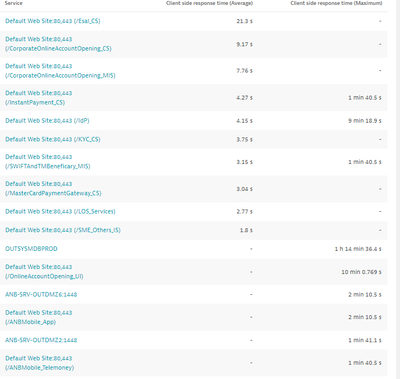
My problem (as shown on the screen below), some services have the "average", but not the "maximum" and vice versa...
Also, the list is not complete, I want the whole services.
Do you have any information about this mistake?
Thanks and have a good day.
Sharing Knowledge
Solved! Go to Solution.
Labels:
- Labels:
-
dashboards classic
-
services classic
8 REPLIES 8


Options
- Mark as New
- Subscribe to RSS Feed
- Permalink
08 Sep 2021 08:39 PM
I'm almost sure it's the cardinality limit you have hit. By default the data explorer limits 10 dimensions, see default generated code:
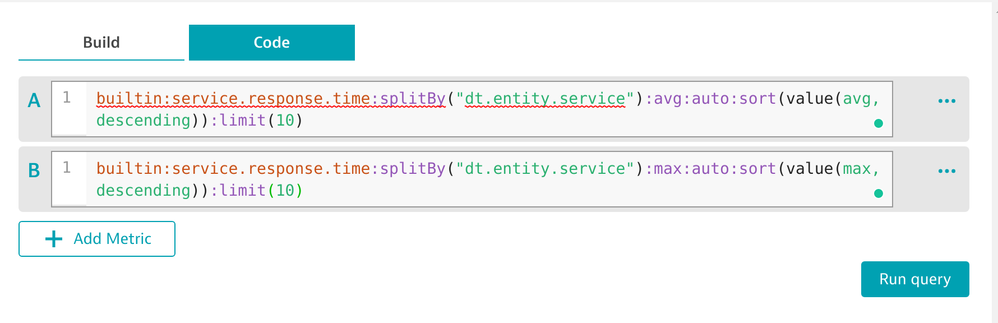
If you have more than 10 services, you need to limit the scope or increase the limit. The issue here is the queries are limited and then joined in a table, so that's why you can see mostly either avg or max values only.
FYI - the limit is 100 per metric selector.
Dynatrace Ambassador | Alanata a.s., Slovakia, Dynatrace Master Partner
Reply
Options
- Mark as New
- Subscribe to RSS Feed
- Permalink
09 Sep 2021 06:24 AM
Thanks a lot @Julius_Loman for your feedback and time.
I explored the code side but didnt take a time to analyse and understand what its writen, i was searching an option but not a code.
Good day man.
Sharing Knowledge
Options
- Mark as New
- Subscribe to RSS Feed
- Permalink
09 Sep 2021 06:32 AM
Other thing
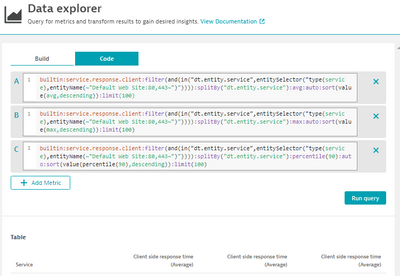
I opened a RFE since some weeks
Look at the column names, different aggregations with the same column names.
Sharing Knowledge

Options
- Mark as New
- Subscribe to RSS Feed
- Permalink
09 Sep 2021 09:06 AM
passed it to the team, yes I believe it does! Thanks @Julius_Loman for tagging me!
Reply
Options
- Mark as New
- Subscribe to RSS Feed
- Permalink
09 Sep 2021 11:42 AM
Hello @zietho
We really need an export option.
This result was asked me to be shown on an excel sheet, I spent a lot of time to make it in the right format.
Sharing Knowledge
Options
- Mark as New
- Subscribe to RSS Feed
- Permalink
09 Sep 2021 11:44 AM
we are currently planing for smaller but important additions for q4 and the export known from CC is def. one of the items on the plate and also with a high priority. will let you know when i can comm. a version.
Reply
Options
- Mark as New
- Subscribe to RSS Feed
- Permalink
09 Sep 2021 12:43 PM
update: it's a bug and with the ability to rename we also removed this buggy automatic differentiation which we put there in the first place to aid the cases with the same name.
Reply

Featured Posts
