This website uses Cookies. Click Accept to agree to our website's cookie use as described in our Privacy Policy. Click Preferences to customize your cookie settings.
Log Analytics
Turn on suggestions
Auto-suggest helps you quickly narrow down your search results by suggesting possible matches as you type.
- Community Home
- Platform
- Log Analytics
- Apply Best Practices for Log Filtering in Dynatrace
Options
- Subscribe to RSS Feed
- Mark Topic as New
- Mark Topic as Read
- Pin this Topic for Current User
- Printer Friendly Page

Options
- Mark as New
- Subscribe to RSS Feed
- Permalink
27 Apr 2022
10:37 PM
- last edited on
26 Jan 2026
12:14 PM
by
 IzabelaRokita
Summary: This post outlines recommended techniques for filtering logs in Dynatrace. It covers field selection, query optimisation, indexing considerations, and how to reduce noise in dashboards or alert triggers.
I was wondering if anyone wanted to share how they're filtering logs in a way aside from Management Zones if they want to review data for a particular group of hosts/applications.
Currently, I have Management Zones set up where QA servers are in their own MZs, and so if I want to see dashboards/logs/etc for QA only, I can just go to the QA MZ.
With logs, I was hoping that I could filter logs via host.group or host.tag because that would have made it tremendously helpful to be able to limit my search criteria based on host groups or host tags, because otherwise, I see limited value in host groups or host tags. But at the moment, my thoughts are that I have to limit the data based on Management Zones if I only want to filter based on QA.
I do realize I can search for only QA servers (where I enter one server at a time due to the wildcard not being allowed in the middle of a search criteria, like a hostname), but that is not going to be as useful if I want to search for something among a plethora of servers.
Maybe re-purposing dt.process_groups?
I do realize that Dynatrace is not meant to be a log viewing tool, but if someone still wanted to view logs, the current setup leaves an entire universe to be desired.
Solved! Go to Solution.
Labels:
- Labels:
-
log monitoring classic
1 REPLY 1

Options
- Mark as New
- Subscribe to RSS Feed
- Permalink
29 Apr 2022 12:05 AM
Hey shakib,
The best way I have seen log filtering done is with manual log ingestion rather than the automated system. With the manual method through the API you can attach custom key value pairs to then use for filtering in the UI. While this doesn't help with your current predicament it could be something to look into implementing if you have the time.
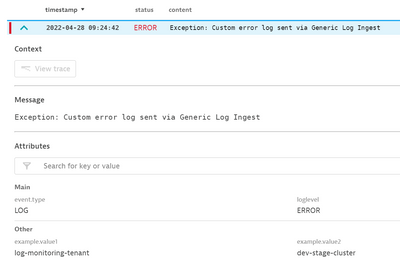
An example of what this looks like.
Below are a couple of documentation pages for reference.
https://www.dynatrace.com/support/help/how-to-use-dynatrace/log-monitoring/acquire-log-data/log-data...
Reply

Featured Posts
