This website uses Cookies. Click Accept to agree to our website's cookie use as described in our Privacy Policy. Click Preferences to customize your cookie settings.
Open Q&A
If there's no good subforum for your question - ask it here!
Turn on suggestions
Auto-suggest helps you quickly narrow down your search results by suggesting possible matches as you type.
- Community Home
- Platform
- Open Q&A
- Re: ERROR duplicate key: tracestate:
Options
- Subscribe to RSS Feed
- Mark Topic as New
- Mark Topic as Read
- Pin this Topic for Current User
- Printer Friendly Page
ERROR duplicate key: tracestate:

Options
- Mark as New
- Subscribe to RSS Feed
- Permalink
23 Mar 2026 05:33 PM
We have a mobile application running on a Linux host with the JBoss EAP 7.4 application server, where we have OneAgent 1.327 installed and running.
Problem:
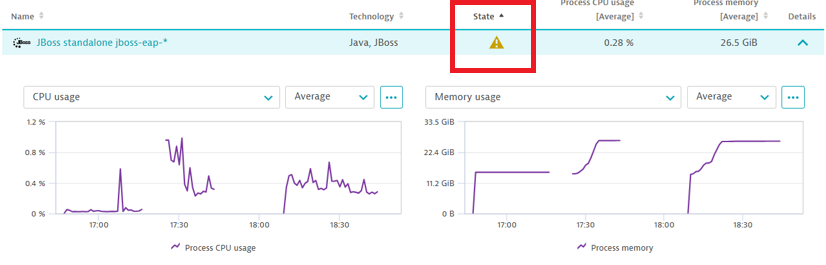
1. The Dynatrace console displays the following message on the Host page: “This process must be restarted”
2. When we restart the JBoss processes, the application fails to run. Then, the log file shows the following message: “ERROR [stderr] (ServerService Thread Pool -- 98) com.google.gson.JsonSyntaxException: duplicate key: tracestate: a1350951-c51fa121@dt”
3. However, if we stop the OneAgent and restart the JBoss processes, the application works correctly; but when we restart the OneAgent on the Host we receive again the message “This process must be restarted" on the Dynatrace Console.
Could anyone give me some ideas on What I should check to fix this error?
Labels:
- Labels:
-
installation
-
oneagent
-
processes
-
services
2 REPLIES 2



Options
- Mark as New
- Subscribe to RSS Feed
- Permalink
08 Apr 2026 09:44 AM
Hmmm I haves some ideas to at least begin a troubleshoot.
1. Did you remove any old Dynatrace instrumentation before installing the current version of the OneAgent? If you check in standalone.conf or domain.conf, do you find a "manual" path to an older library? You can search for "agent" in the files. Then it might be, that two injections are being forced (manual + the new automatic). If you find it, comment it out and restart the process. Any improvement?
2. Are there any other agents of observability tools that you are using? Sometimes they're in each other's way... in case you do, what happens if you turn the other one off? Or at least run it in an infra-only scenario without injection?
I am basically just testing for any sort of double instrumentation now, it might also be something else, but this could be a good start to check.
A Dynatrace Professional nerd working for Conclusion Xforce
Reply

Options
- Mark as New
- Subscribe to RSS Feed
- Permalink
08 Apr 2026 02:02 PM
Hi,
This most likely looks like double instrumentation or duplicate trace-context injection, rather than a JBoss restart issue itself.
The “This process must be restarted” message is expected after a OneAgent installation or update, because already running Java processes must be restarted so OneAgent can inject and start deep monitoring. So that part is normal.
The error
duplicate key: tracestate: ...@dtsuggests, as @marina_pollehn mentioned, that the application or one of its parsers/serializers is seeing more than one tracestate entry. Because of that, I would check whether any of the following are present at the same time:
- old/manual Dynatrace instrumentation in standalone.conf or domain.conf
- another Java agent (-javaagent)
- OpenTelemetry or another APM agent running together with OneAgent
- custom code parsing trace headers as JSON/maps and failing on duplicates
Dynatrace documentation also warns that when OneAgent and OpenTelemetry both capture/export tracing data, you can end up with duplicate spans and conflicting telemetry.
OneAgent with OpenTelemetry data
Check standalone.conf, standalone.conf.bat, domain.conf, and JBoss startup scripts for:
- -javaagent
- old Dynatrace/AppMon libraries
- OpenTelemetry Java agent
Then env variables like JAVA_OPTS or JAVA_TOOL_OPTIONS.
Also that the application also includes a manual OTel or Dynatrace SDK.
As a test, you could temporarily run the process in infra-only mode or without deep monitoring to confirm whether the issue is caused by code instrumentation rather than JBoss itself. Dynatrace supports this through monitoring mode and process-group deep monitoring settings.
here is doc how change monitoring mode: OneAgent monitoring modes
and here how disable deep monitoring on process group: Process deep monitoring
Reply

Featured Posts
