This website uses Cookies. Click Accept to agree to our website's cookie use as described in our Privacy Policy. Click Preferences to customize your cookie settings.
Open Q&A
If there's no good subforum for your question - ask it here!
Turn on suggestions
Auto-suggest helps you quickly narrow down your search results by suggesting possible matches as you type.
- Community Home
- Platform
- Open Q&A
- Low disk space
Options
- Subscribe to RSS Feed
- Mark Topic as New
- Mark Topic as Read
- Pin this Topic for Current User
- Printer Friendly Page


Options
- Mark as New
- Subscribe to RSS Feed
- Permalink
18 Jan 2023 09:03 AM
Hi Team,
Is there any formula on how disk usage is captured in dynatrace. we have received an alert for low disk space but as confirmed by the customer the H drive is free for more than 50% on the server.
Solved! Go to Solution.
Labels:
2 REPLIES 2


Options
- Mark as New
- Subscribe to RSS Feed
- Permalink
18 Jan 2023 12:38 PM
@Vikas_g1997 Out of the box, Dynatrace will leverage a baselining. This baseline is formulated over 7 days. As days elapse and you get closer to completing 7 days of baselining, the AI Baseline for the given entity gets better and better. So if your host uses 50% disk space over the past week, and that jumps up to 80%, that's 30% increase is enough of a deviation from the established baseline to trigger a problem being raised.
Yes, organizations might want a static alert in the sense that they don't want to be bothered until a threshold is met, say 10% free space left. This can also be set via the host settings under anomaly detection.
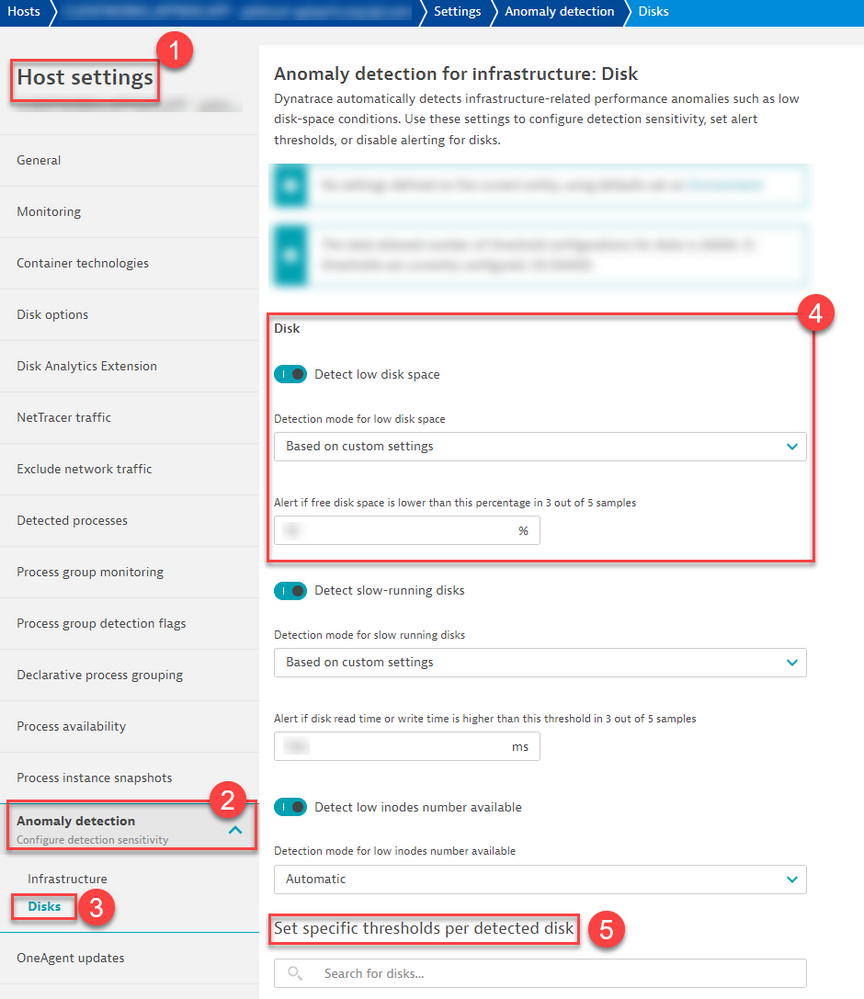
-Chad
Reply

Options
- Mark as New
- Subscribe to RSS Feed
- Permalink
10 Mar 2026 09:59 AM
@ChadTurner, coming across this and would like to clarify...
Does it mean if I change the Detection mode for low disk space to "Based on custom settings", the "AI baseline" will longer work (i.e. no problem for an increase in disk space from 50% to 80% in the above scenario)?
Many thanks!

Featured Posts
