This website uses Cookies. Click Accept to agree to our website's cookie use as described in our Privacy Policy. Click Preferences to customize your cookie settings.
Dashboarding
Dynatrace dashboards, notebooks, and data explorer explained.
Turn on suggestions
Auto-suggest helps you quickly narrow down your search results by suggesting possible matches as you type.
- Community Home
- Platform
- Dashboarding
- Re: changing time frame -Data explorer
Options
- Subscribe to RSS Feed
- Mark Topic as New
- Mark Topic as Read
- Pin this Topic for Current User
- Printer Friendly Page

Options
- Mark as New
- Subscribe to RSS Feed
- Permalink
28 May 2023
05:32 PM
- last edited on
27 Jan 2026
11:53 AM
by
 IzabelaRokita
Summary: This post explains how to change the time frame inside the Data Explorer and how it interacts with dashboard‑level settings. It discusses what is currently supported.
Hi Team,
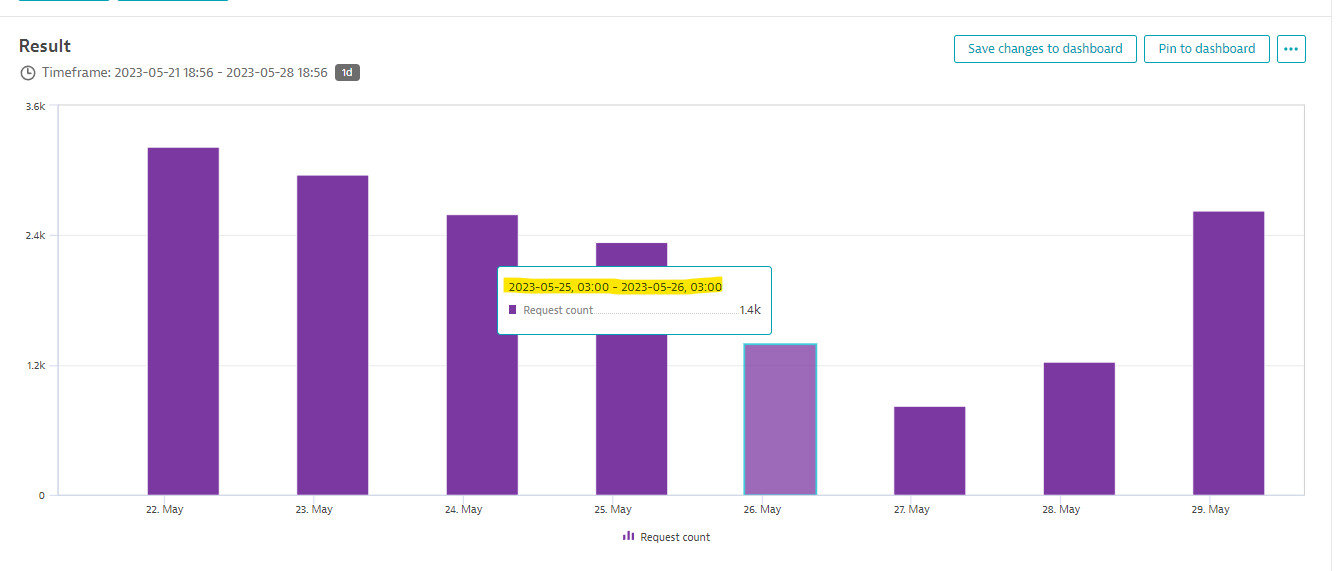
We're trying to create a dashboard that will show us results for the last week,
while the resolution is 1 day.
The Problem is that the resolution displays results for a timeframe from 3:00-3:00 instead of 00:00-23:59 .
Can someone explain how to change it?
Thanks in advance.
Idan
Solved! Go to Solution.
Labels:
- Labels:
-
dashboards classic
-
data explorer
-
timeframe
screen shot .png
22 KB
Reply
3 REPLIES 3


Options
- Mark as New
- Subscribe to RSS Feed
- Permalink
29 May 2023 08:15 AM
Hi,
You can see internal granularity leves.
I cannot understand you which problem you have. Could you please elaborate a little more?
Best regards
❤️ Emacs ❤️ Vim ❤️ Bash ❤️ Perl

Options
- Mark as New
- Subscribe to RSS Feed
- Permalink
29 May 2023 08:29 AM
@AntonPineiro the issue is that Dynatrace does not have support for timezones in Data Explorer.
See more also in this Product idea https://community.dynatrace.com/t5/Product-ideas/RFE-API-with-timezone-support/idi-p/152443
You will always end with incorrect buckets unless you are in the GMT timezone. This is especially noticeable when your granularity is 1 day.
Dynatrace Ambassador | Alanata a.s., Slovakia, Dynatrace Master Partner
Reply

Featured Posts
