This website uses Cookies. Click Accept to agree to our website's cookie use as described in our Privacy Policy. Click Preferences to customize your cookie settings.
Dashboarding
Dynatrace dashboards, notebooks, and data explorer explained.
Turn on suggestions
Auto-suggest helps you quickly narrow down your search results by suggesting possible matches as you type.
- Community Home
- Platform
- Dashboarding
- How to refernce a $Variable if the returned output is a Table
Options
- Subscribe to RSS Feed
- Mark Topic as New
- Mark Topic as Read
- Pin this Topic for Current User
- Printer Friendly Page
How to refernce a $Variable if the returned output is a Table

Options
- Mark as New
- Subscribe to RSS Feed
- Permalink
18 Feb 2026
05:25 AM
- last edited on
18 Feb 2026
07:41 AM
by
 MaciejNeumann
Hi Guys
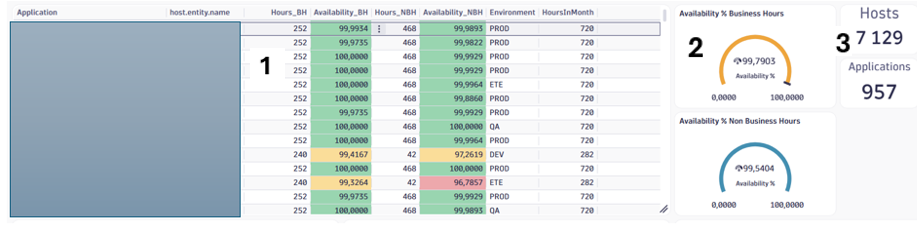
These are a couple of Visuals I have in an Availability Dashboard (refer to attached image)
Description of visuals referenced by numbers
1 – DQL query – Host availability per Application and Host - Visual = Table
2 – Same DQL query as in (1) with the addition of a summarize/ avg calculation (by Application)
| summarize {avg(Availability_BH),avg(Availability_NBH)}, by:{$Application}
3 – Hosts - Same DQL query as in (1) with the addition of a summarize / count (by Host)
| summarize Hosts = countDistinct(host.entity.name)
3 – Applications - Same DQL query as in (1) with the addition of a summarize / count (by Applications)
| summarize Applications = countDistinct(Application)
This scenario works fine but it is not efficient from a DQL query perspective as it needs to be run 5 times, once for the Detail (1) and then again for the remaining visuals(2,3) based on what summarization needs to take place depending on the Visual used
What I want to be able to do is perform the DQL query only once and then reference it in the other visual and then perform the required summarization
This could be possible by defining a hidden Variable called “HostDetail” and running the detail DQL query here which will contain the output in Table format as per (1) – I could then reference it and do the summarization
If the $HostDetail was JSON referencing it will be quite straightforward as it would be done as follows:
data json:$HostDetail
However because it is a Table I am not sure how to reference $HostDetail, I have referred to the DQL reference and tried a number of DQL functions but have been unsuccessful as I am not sure which function to use
Basically i am looking for this kind of syntax
data ??????($HostDetail)
Is it possible? Looking for help with DQL syntax to use in this scenario
Why I want to get this working:
- A single DQL query to maintain
- Cost saving as the DQL query only needs to run once and then referenced in a $Variable based on summarization preference
- More efficient
Appreciate the assistance
Thanks
Alan
Labels:
- Labels:
-
dashboards
-
dql
variable_relationships.png
105 KB
2 REPLIES 2
Options
- Mark as New
- Subscribe to RSS Feed
- Permalink
19 Feb 2026 09:33 AM
Just an update
I have made some progress on this - what I do at the end of the DQL now is to convert the Table into a JSON array as follows:
| fieldsAdd row = record(Field1=Field1,Field2=Field2 ,Field3=Field3)
| summarize all_rows = collectArray(row)
The data is returned in JSON format (Validated by an online JSON validator) - see sample data below
However referencing the variable as follows does still not work
The data is returned in JSON format (Validated by an online JSON validator) - see sample data below
However referencing the variable as follows does still not work
data json:$HostDetail
I get this error msg so it does seem as if the format may not be seen as JSON but it is
The command `data` parameter `json` value is invalid: the value needs to be a JSON object or JSON array of JSON objects. Please specify a valid parameter and try again.
Here is a sample of the returned JSON
[{"MonthId":"202602","host.id":"HOST-318A276BB0F116E1","host.entity.name":"Server1","Cloud_or_OnPremises":"Cloud","osArchitecture":"X86","osType":"WINDOWS","Hypervisor":"HYPER_V","Environment":"QA","Hours_BH":"59","Availability_BH":98.44632768361582,"Availability_BH_w10":9.844632768361583,"Hours_NBH":"79","Availability_NBH":95.61181434599156,"Availability_NBH_w5":4.780590717299578,"HoursInMonth":"138","Hours_Check_MustBeZero":"0","Application":"Application 1"},{"MonthId":"202602","host.id":"HOST-45D773ABF8B98F74","host.entity.name":"Server2","Cloud_or_OnPremises":"OnPremises","osArchitecture":"X86","osType":"WINDOWS","Hypervisor":"VMWARE","Environment":"PROD","Hours_BH":"61","Availability_BH":98.87978142076503,"Availability_BH_w10":9.887978142076504,"Hours_NBH":"108","Availability_NBH":100,"Availability_NBH_w5":5,"HoursInMonth":"169","Hours_Check_MustBeZero":"0","Application":"Application 1"}]
I would appreciate any insights
Thanks
Alan
Options
- Mark as New
- Subscribe to RSS Feed
- Permalink
19 Feb 2026 09:41 AM
I forgot to add that i also tested in notebook as follows and data was returened sucessfully
data json:"""
[{"MonthId":"202602","host.id":"HOST-318A276BB0F116E1","host.entity.name":"Server1","Cloud_or_OnPremises":"Cloud","osArchitecture":"X86","osType":"WINDOWS","Hypervisor":"HYPER_V","Environment":"QA","Hours_BH":"59","Availability_BH":98.44632768361582,"Availability_BH_w10":9.844632768361583,"Hours_NBH":"79","Availability_NBH":95.61181434599156,"Availability_NBH_w5":4.780590717299578,"HoursInMonth":"138","Hours_Check_MustBeZero":"0","Application":"Application 1"},{"MonthId":"202602","host.id":"HOST-45D773ABF8B98F74","host.entity.name":"Server2","Cloud_or_OnPremises":"OnPremises","osArchitecture":"X86","osType":"WINDOWS","Hypervisor":"VMWARE","Environment":"PROD","Hours_BH":"61","Availability_BH":98.87978142076503,"Availability_BH_w10":9.887978142076504,"Hours_NBH":"108","Availability_NBH":100,"Availability_NBH_w5":5,"HoursInMonth":"169","Hours_Check_MustBeZero":"0","Application":"Application 1"}]
"""
So looks more like an issue accessing the $Variable in Dashboards

Featured Posts
