This website uses Cookies. Click Accept to agree to our website's cookie use as described in our Privacy Policy. Click Preferences to customize your cookie settings.
Troubleshooting
Articles about how to solve the most common problems
Turn on suggestions
Auto-suggest helps you quickly narrow down your search results by suggesting possible matches as you type.
- Community Home
- Platform
- Troubleshooting
- Browser Monitors: How to enable 3rd Party cookies
Options
- Subscribe to RSS Feed
- Mark as New
- Mark as Read
- Printer Friendly Page

 HannahM
Dynatrace Guru
Options
- Mark as New
- Subscribe to RSS Feed
- Permalink
28 May 2025 02:43 PM - edited 21 Aug 2026 03:44 PM
Summary
Since Chromium version 122, third-party cookies are blocked by default. This can cause Dynatrace Synthetic Browser Monitors to behave differently from real-user browsing sessions, resulting in pages failing to load, authentication issues, or incomplete transactions.
This article explains how to identify when blocked third-party cookies are causing Browser Monitor failures and how to enable third-party cookies for local playback and Private Synthetic Locations.
- Summary
- Problem
- Resolution
- Local playback
- Option 1: Disable Third-Party Cookie Blocking in Chrome Incognito
- Option 2: Allow Third-Party Cookies for Specific Sites
- Private Synthetic Locations
- Cluster Version 315 and Later
- Cluster Versions Prior to 315
- Step 1: Identify Existing Disabled Features
- Step 2: Apply the Configuration
- What's next
- Related reading
Problem
A Dynatrace Browser Monitor doesn't load a website as expected, even though the site works correctly when accessed manually.
Browser Monitor screenshots may show incomplete rendering or failure messages caused by required third-party cookies being blocked.
Because Chromium 122 blocks third-party cookies by default, websites that rely on them may not function correctly during Synthetic execution unless this behavior is explicitly disabled.

Resolution
Local playback
There are two supported approaches.
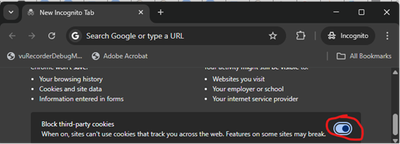
Option 1: Disable Third-Party Cookie Blocking in Chrome Incognito
- Open an Incognito window.
- Navigate to Chrome privacy settings.
- Disable Block third-party cookies.
This setting persists for future local playbacks.
Option 2: Allow Third-Party Cookies for Specific Sites
- Open Chrome.
- Navigate to
chrome://settings/cookies -
Add the affected website domain to the list of sites allowed to use third-party cookies.

Private Synthetic Locations
To allow third-party cookies in Private Synthetic Locations, disable Chromium's third-party cookie protection feature by using the startup parameter:
--disable-features=TrackingProtection3pcdCluster Version 315 and Later
No configuration changes are required.
Starting with Cluster version 315, the
TrackingProtection3pcd Chrome feature is disabled by default.Important
If you previously customized the Browser Monitor configuration using the procedure for older cluster versions, review and remove the custom configuration where appropriate so that the default feature list can be used.
Cluster Versions Prior to 315
What's next
If this does not resolve the issue, please open a support ticket and provide
- a link to the affected monitor
- mention this article and any other troubleshooting steps taken
Related reading
📖 Script mode for Browser monitor configuration
📖 Synthetic Troubleshooting Map

Step 1: Identify Existing Disabled Features
--disable-features=and copy the whole value.For example,
So, the value is
,TrackingProtection3pcdto the list of values.Step 2: Apply the Configuration
This feature can be disabled for all monitors running on the ActiveGate, or for a single monitor.
Note: These changes persist on update, so if new features are disabled by default, you may need to update your snippet.
Option A: All Browser Monitors on the ActiveGate
user.propertiesfileC:\\ProgramData\\dynatrace\\synthetic\\config\\user.propertieson Windows/var/lib/dynatrace/synthetic/config/user.propertieson Linux--disable-featuressnippet created earlier aftercom.ruxit.vuc.poolConfig.playerConfig.additionalStartupParams=--disable-features. For exampleOption B: Single Browser Monitor
Save your changes