Editor's note · May 20, 2026
This post has been fully rewritten to reflect the current Enhanced Endpoint Guide. The structure, examples, screenshots, and rollout details have all changed since the previous version. If you've bookmarked an earlier paragraph or linked an old section, you may want to re-read top to bottom.
Changes are scheduled to start during the rollout of SaaS Cluster version 1.342, which is scheduled to begin on June 30th.
How endpoint detection looks in Dynatrace depends on a few things: which app you're using (Classic or the new Services app), whether Enhanced Endpoints is enabled, whether your services run on Service Detection v1 or v2, and whether your applications emit http.route on their spans. Different combinations produce noticeably different pictures in the Services app, and the path forward from each one isn't the same.
This guide walks through those combinations one at a time. Read the sections in order if you want the full picture, or skip to the one that matches your situation.
Classic Services and Key Requests
In Service Detection v1 (SDv1) on the Classic Services app, the way you get per-request detail is to mark requests as Key Requests.
You'd open a service, click View all request details, find the request you cared about (say, /orders/search), and pick Mark as key request. After that, Dynatrace tracked that request as its own row with golden-signal metrics, anomaly detection, and so on.

What that looks like in Classic. The service overview screen has a Key Requests / Endpoints panel listing your marked requests. Requests you didn't mark don't get their own row in Classic; their data folds into the service's aggregate metrics.
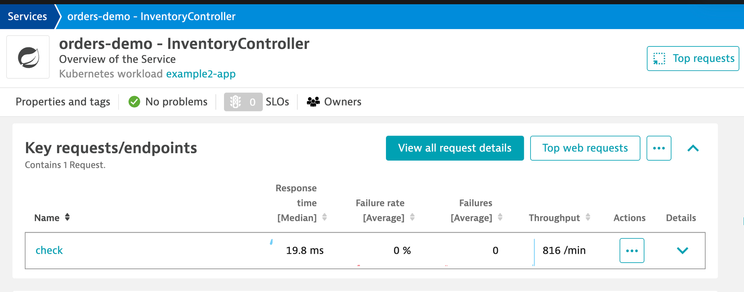
What that looks like in the new Services app. Same data, new vocabulary. The new app uses the word endpoint and surfaces the same Key Request as a row in the Endpoints tab.

What that looks like in DQL.
Anything you didn't mark is bucketed into a catchall row labeled NON_KEY_REQUESTS. That catchall row is a Latest-app concept; it doesn't appear in Classic.
timeseries count = sum(dt.service.request.count,
filter: dt.entity.service == "<SERVICE-ID>"),
by:{endpoint.name}, from: now()-5m
| sort arrayLast(count) desc
You'll see two rows: the Key Request and the catchall.

The friction with Key Requests in Classic is that you had to mark each request by hand. If you cared about a hundred URL paths across fifty services, that was five thousand clicks.
What Enhanced Endpoints changes
Enhanced Endpoints for SDv1 is the setting that removes the manual marking step. Once you enable it on a namespace (Settings → Process and Contextualize → Services → Enhanced endpoints for SDv1), Dynatrace auto-detects an endpoint for every request that has a stable name available. You still get the same per-row metrics, anomaly detection, and dashboard support, just without the Key Request step.
What changes:
-
Classic doesn't change. It still shows only the requests you marked. Classic is the manual-only world.
-
The Latest Services app fills in. Every request that arrives with an http.route attribute becomes its own endpoint row. Spring Boot, Express, FastAPI, ASP.NET Core, .NET , Django, and Flask all set http.route for you. Anything you've configured with Request Naming Rules also surfaces as a named endpoint row (depending on which placeholders the rule uses).

The DQL query from the previous section still works, but the result now it has two named endpoints, instead of one for search, and NON_KEY_REQUESTS since we never marked submit as a key request. With Enhanced Endpoints on we didn’t have to.
Enhanced Endpoints turns "requests you marked by hand" into "every request Dynatrace can identify".
The next two steps are about what happens when Dynatrace can't identify a request, and what you can do about it.
When http.route is missing: the over-collapse problem
Most application frameworks set http.route for you, but most reverse proxies and gateways don't. Nginx, Apache, Kong, IIS, and many ingress controllers route requests without ever stamping the original URL template back onto the span. If any of your monitored services fall into that category, this section applies to you.
When a request lacks http.route, Enhanced Endpoints has nothing to grab onto. In our first release of Enhanced Endpoints, the default rule that fired next collapsed every method-matched request into one bucket per HTTP method: GET /*, POST /*. Later in this guide you’ll read how to solve this problem, and also learn about a new endpoint-naming heuristic coming in the next few weeks to detect certain patterns automatically.

The URL path is still on the span, so the data isn't lost; only the grouping is bad. You can confirm that yourself:
fetch spans, from: now()-15m
| filter dt.entity.service == "<the over-collapsed service>"
| filter endpoint.name == "GET /*"
| fields timestamp, http.request.method, url.path
| limit 30
You'll see thirty different URLs all stamped with endpoint.name = GET /*.

To summarize: Enhanced Endpoints, with no http.route and no rules means everything collapsing to GET /*. The data is fine; the grouping is bad.
To find where this is happening across your own tenant:
timeseries c = sum(dt.service.request.count),
  by:{dt.entity.service, endpoint.name}, from: now()-1h
| filter endpoint.name == "GET /*" or endpoint.name == "POST /*"
| summarize total = sum(arrayLast(c)), by:{dt.entity.service}
| sort total desc | limit 20
That will give you the top-twenty over-collapse offenders.
Fixing over-collapse today: rules
As mentioned, Dynatrace will be releasing a better endpoint heuristic in the coming weeks, but you don't have to wait for anything to fix the over-collapse on a service. Two rule-based mechanisms are available right now.
Request Naming Rules with {URL:Path-Clean} (SDv1)
For SDv1 services, write a Request Naming Rule (Settings → Service Detection → Request Naming Rules) with the pattern {URL:Path-Clean}. Dynatrace will use the request URL but replace volatile-looking segments with stable markers.

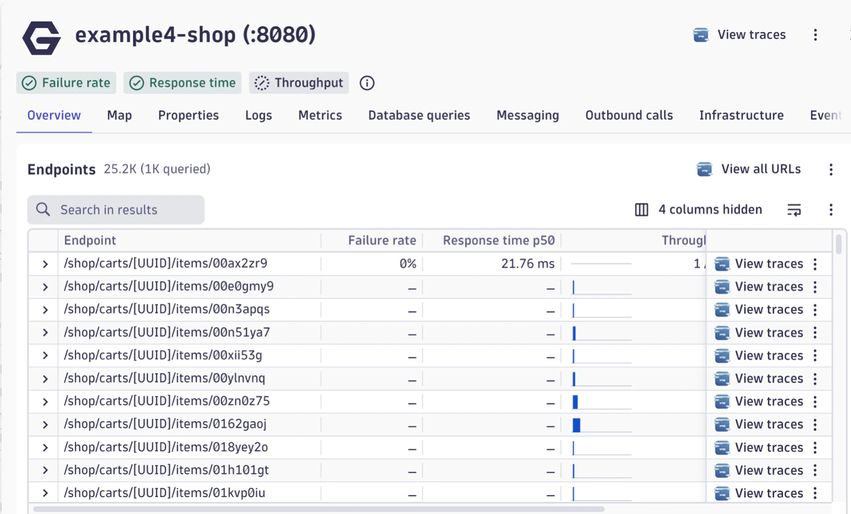
What Path-Clean catches: four specific patterns, each replaced with a stable token: UUIDs (so e4674467-1e9a-42cf-… becomes [UUID]), IPv4 addresses ([IPv4]), IPv6 addresses ([IPv6]), and IBANs ([IBAN]). Any clean-up URL rules you've configured on the service (for example, to strip jsessionid from the URL) are always applied as well, regardless of whether Path-Clean is in the naming pattern.
What Path-Clean leaves alone: short mixed-case alphanumeric IDs like 0erepyo9 or abc123. The detector doesn't recognize those as volatile, so they stay literal, meaning each unique value becomes its own endpoint row.
If your IDs look like that, Path-Clean alone won't be enough. You'd combine it with a custom placeholder that strips or templates the volatile portion explicitly.
A custom placeholder is a user-defined transformation that wraps one of the same volatile attributes the built-in placeholders use (for example, URL_PATH, the source attribute behind {URL:Path-Clean}) and applies an extraction step on top: a delimiter split, a regex capture, and so on. The result becomes a named token you can reference in your Request Naming Rule pattern. The example below configures one such placeholder, named ItemPath, defined as a regex extraction ^(/shop/[^/]++) against URL_PATH. The intent is to keep only the first two segments of any /shop/... URL path, dropping everything after.

There's a subtlety worth knowing in advance. The SDv1 naming-behavior changes shipping in cluster version 1.341 (the endpoint-naming heuristic, the custom-placeholder resolution described next, and the related URL-path handling) are bundled behind one per-tenant feature flag. Until that flag is on for your tenant, custom placeholders that wrap a URL-path attribute do not resolve at the endpoint-name level. They render as the literal placeholder string (for example, endpoint.name = {ItemPath}) because the current SDv1 default-name code path treats URL-path attributes as too volatile to substitute directly.
After the flag is on, the same rule starts resolving as expected, alongside the heuristic-derived names. The flag does not make raw volatile URL-path values resolve on their own. Those still won't. What it enables is your custom placeholder's transformation taking effect, so the wrapped URL-path attribute resolves only because your extraction step (regex, delimiter split, and so on) has rendered it non-volatile.
Built-in placeholders are not affected. This flag only gates the resolution of custom placeholders that wrap a volatile URL-path attribute. A built-in placeholder like {URL:Path-Clean} always resolves regardless of the flag's state because Dynatrace deems its output non-volatile. That's the goal of {URL:Path-Clean}: it cleans the path, so the result is stable. A rule like {URL:Path-Clean} is therefore safe to use today and will keep producing the same endpoint name before and after the flag flips.
Here’s what it looks like before the feature flag:

And here’s what it looks like afterwards:
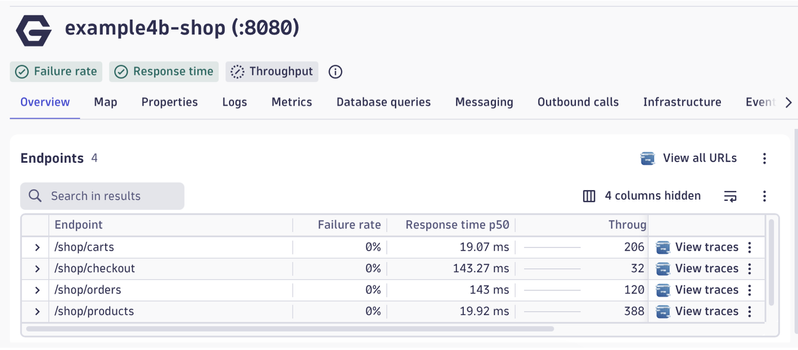
You can see the result in a Notebook as follows:
timeseries count = sum(dt.service.request.count,
filter: dt.entity.service == "<service-id>"),
by:{endpoint.name}, from: now()-5m
| sort arrayLast(count) desc

URL path pattern matching (SDv2)
On SDv2, the equivalent customer-facing rule is URL path pattern matching (Settings → Service Detection → URL path pattern matching, or builtin:url-path-pattern-matching-rules in the API). You describe your URL shapes directly:
/shop/carts/{cartId}/items/{itemId}
/shop/orders/{id}
/shop/checkout


This is the same Nginx workload, but now you see what matters instead of a single GET /*. Rules let you template your URLs by hand. They work today. They do take some maintenance, especially across many services, which brings us to a description of the heuristic in the next section.
The endpoint-naming heuristic that's coming
The endpoint-naming heuristic does what those rules do, but automatically.
When http.route is missing on the ingested data, the heuristic looks at the raw URL path, identifies the volatile segments (the same kinds of patterns Path-Clean catches, plus some more), and produces a http.route attribute based on that URL path. The already existing rule: [Built-in] HTTP request method and route will now trigger and produce a stable endpoint name. No rule authoring required.
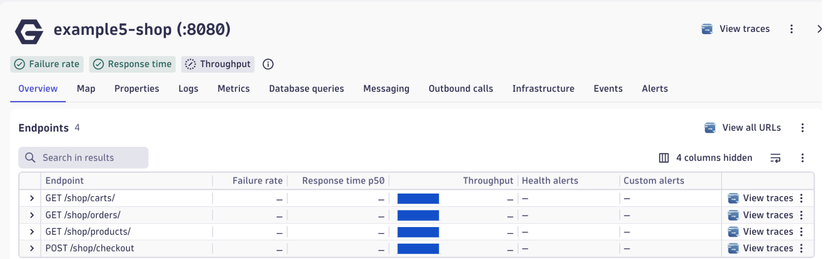
After the heuristic activates, the same Nginx service that was showing GET /* shows GET /shop/products, GET /shop/carts, and so on. The catch-all collapses into one endpoint per real URL shape.
When it ships
The following rollouts, for SDv1 and SDv2, are scheduled to start in SaaS cluster 1.342 on June 30th.
The rollout puts all the code in place but changes nothing on its own. The new naming takes effect only when you choose to make it, by flipping the SDv1 feature flag and disabling the SDv2 built-in rule.
These are two independent switches you control on your own timeline: either order, or both at once.
SDv1 rollout: a per-tenant feature flag. One flag (the SDv1 naming flag) gates the whole SDv1 bundle. When it's on, heuristic-derived names plus the related naming behavior land together; until then, none of them do.
-
If you don't have Enhanced Endpoints turned on yet, when you enable it any time from 1.341 onward, the new SDv1 naming behavior comes with it, on by default. You go straight from "Key Requests only" to "clean endpoint names" with no intermediate GET /* phase.
-
If you already enabled Enhanced Endpoints, the SDv1 naming flag is off by default for you, on purpose, because some of your existing dashboards, SLOs, and alerts may bind to current endpoint names like GET /* and turning the flag on changes those names. The guardrail gives you time to audit. When you are ready, get in touch with your Dynatrace account team to enable to feature flag: sdv1-url-and-http-route-naming.
SDv2 rollout: a built-in opt-out rule and heuristic. On every existing tenant, Dynatrace pre-provisions a built-in endpoint-detection rule in builtin:endpoint-detection-rules. New tenants created after this point don't get the rule provisioned, so they get the new SDv2 behavior from the start. Existing tenants keep producing GET /* until someone disables that built-in rule. Nothing flips on its own.
-
Name template: {http.request.method} /*
-
Condition: isNotNull(http.request.method) and isNotNull(http.route) and supportability.is_http_route_derived == true
-
Status: enabled by default on every existing tenant. This is a built-in rule that Dynatrace provisions on those tenants. Customers can't manually create it, only enable or disable it.
To see whether the SDv2 heuristic is producing results on a span:
fetch spans, from: now()-15m
| filter dt.entity.service == "<a service that used to over-collapse>"
| fieldsAdd derived = `supportability.is_http_route_derived`
| fields span.name, url.path, http.route, derived, endpoint.name
| limit 20
When http.route is populated and supportability.is_http_route_derived is true, the SDv2 heuristic is active. The route was derived by the heuristic rather than emitted by your app. Until then, http.route is empty (or app-supplied) and the flag is false.
A note on service display names
As described in the community post a out Service Naming rule changes, ff your SDv1 Nginx (or similar non-Java) service shows up in the Services list as just :8080, that's the SDv1 detected name. Legacy Service Naming Rules used to fix this, but they're being retired: they only changed the UI display, never flowed into your spans, metrics, logs, or DQL.
The new approach is to set OTEL_SERVICE_NAME as an environment variable on the process (works with OneAgent, no OTel SDK required):
env:
  - name: OTEL_SERVICE_NAME
    value: my-checkout-service
That value lands as service.name on every span, which flows through to metrics, dashboards, SLOs, and alerting automatically.
What's coming:
-
Primary Fields and Primary Tags will appear as dimensions on service metrics in June 2026, so you can filter and sort the Services list by k8s.namespace.name, team, region, environment, etc. without packing that context into the service name.
-
A short-term display fix under discussion combines service.name with the detected name: my-app (WebRequestService), my-app (BackgroundWorker). Useful when one process hosts multiple SDv1 services.
-
Server-side renaming via OpenPipeline is being explored: a processing rule that sets or overrides service.name based on resource attributes, no deployment changes required.
For now, set OTEL_SERVICE_NAME where you can, and your services will be queryable by the right name even if the Services list display catches up later.